
Automatic Photo Book Maker for Easy Memory Saving
Photo 9
12 min read · June 18, 2026
Automatic Photo Book Maker for Easy Memory Saving
Your camera roll is full of birthdays, holidays, baby milestones, weekend trips, weddings, and the little in-between moments you never want to lose. The problem is that turning those images into something tangible usually feels like a project for “someday.” An automatic photo book maker changes that. Instead of spending hours sorting, dragging, resizing, and rearranging, you can turn digital photos into a polished keepsake in minutes.
For busy parents, couples, travelers, students, and gift buyers, that speed matters. You want something beautiful, personal, and high quality - but without needing design skills or downloading another app. That’s where Photo9 stands out: AI-generated layouts in seconds, smart design suggestions, easy editing in your browser, premium print quality, and fast reliable delivery make memory saving feel simple again.

Why people are switching to automatic photo book creation
Most competing photo book brands focus on templates, size options, paper types, or app-based workflows. Those things matter, but they often skip the biggest real-world pain point: people don’t struggle because they lack inspiration - they struggle because they lack time.
An automatic photo book solves the part most people procrastinate on:
choosing the best photos
putting them in the right order
creating balanced page layouts
making the book look consistent
finishing it before the memory feels old
Instead of starting with a blank page, you start with momentum.
"A 2023 survey found that 80% of Americans have photos or videos on their smartphones that they haven't revisited since the day they were taken." - TechSpot
That stat explains why so many memories stay trapped on phones. The easier the creation process becomes, the more likely people are to actually preserve and enjoy their photos.
What competitors do well - and what they often miss
Looking across leading photo book brands, a few common themes appear again and again:
Common competitor strength | Why it matters | What’s often missing |
|---|---|---|
Many themes and occasions | Helps users get started | Too much choice can still slow people down |
Hardcover, softcover, and layflat formats | Useful for different budgets | Product options are explained more than actual workflow savings |
Mobile apps and syncing | Convenient for on-the-go users | Many users prefer browser-based creation with no app required |
Auto-fill or AI-assisted layouts | Reduces manual effort | Often limited transparency on customization after automation |
Fast delivery and quality claims | Builds trust | Less focus on sustainability, local production, and realistic ease for beginners |
The real content gap is this: many articles tell you that making a photo book is “easy,” but they don’t explain why automation matters for ordinary users who want a fast result without sacrificing quality.
Photo9 bridges that gap with a workflow designed around speed and control together. You get AI assistance, but you never lose the ability to personalize.
What an automatic photo book maker actually does
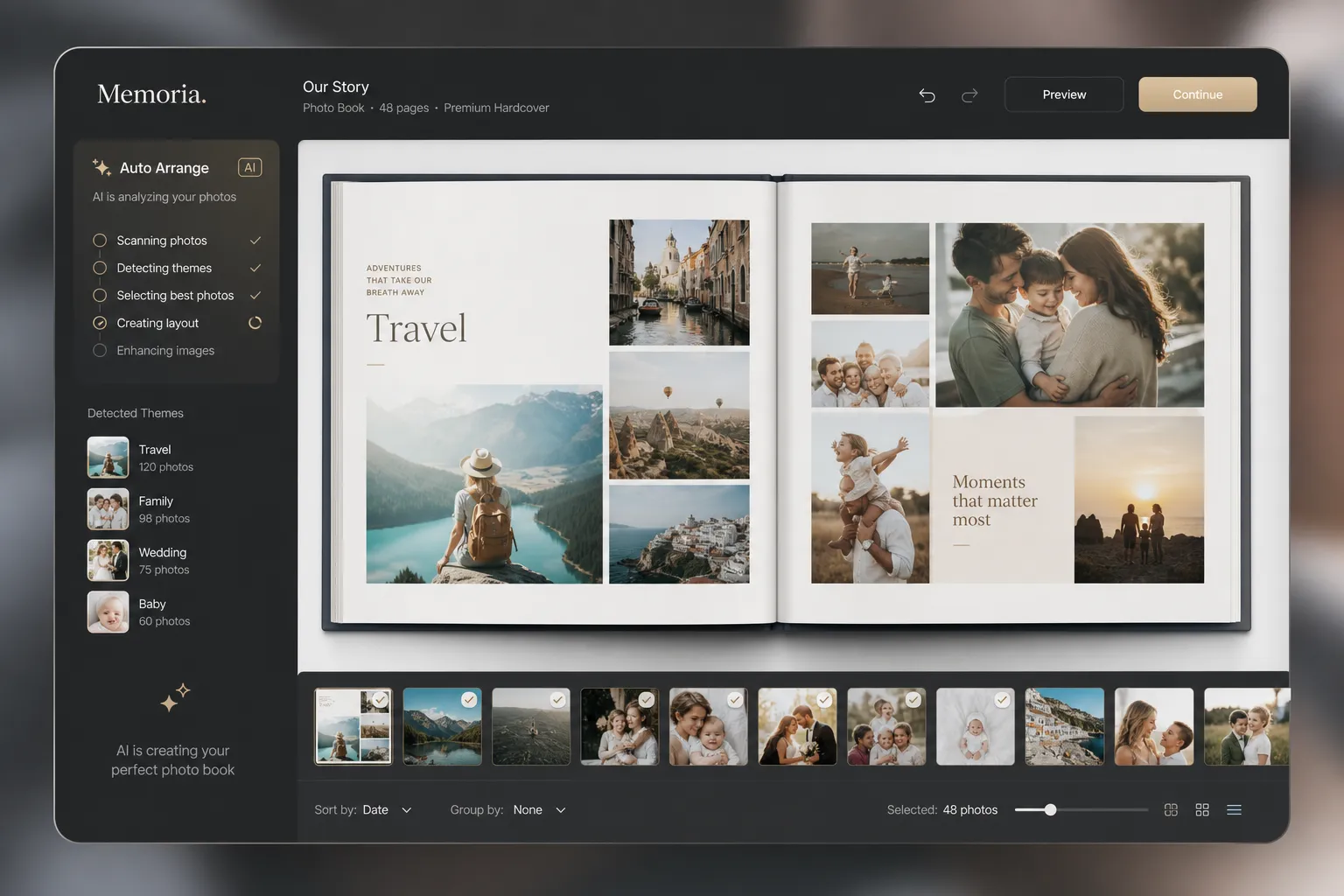
A modern automatic photo book maker uses intelligent layout technology to turn a folder of images into a ready-made draft. Instead of placing each image one by one, the platform analyzes your photos and builds a coherent design for you.
At Photo9, that means:
AI-generated layouts in seconds
smart layout suggestions based on image type and orientation
balanced spreads without awkward cropping
easy text, background, and design edits
3D preview so you can review before ordering
cross-device access from phone, tablet, or desktop
no app required
In practical terms, it feels less like designing from scratch and more like reviewing a professionally prepared first version.
The biggest benefits of using an automatic photo book maker
It saves hours of manual work
Traditional photo book creation can turn into a multi-evening task. You upload images, sort duplicates, choose layouts, move everything around, then keep second-guessing your design. Automation dramatically shortens that process.
Instead of doing 50 tiny decisions page by page, you make a handful of meaningful decisions:
which photos to include
what story you want to tell
whether to add text or extra personal touches
That’s a much better use of your time.
It removes the “blank page” problem
Many people never begin because they don’t know how to start. A blank canvas can feel intimidating, especially if you’re not a designer. An automatic first draft gives you something to react to, improve, and finalize.
That’s especially helpful for:
new parents making baby books
couples creating wedding albums
families compiling year-in-review books
travelers turning phone photos into a story
gift buyers working on a deadline
It still looks polished and personal
Fast does not have to mean generic. The best tools combine automation with customization, so the result feels like your book - not a machine-made placeholder.
With Photo9, you can refine your automatic layout with:
captions and names
cover title changes
background and styling adjustments
photo swaps
smart reflowing of layouts
different photo book formats and themes
If you want more ideas before you begin, explore these personalized photo book ideas for inspiration across travel, family, celebrations, and gifts.
It helps memories become real, not forgotten
Digital photos are convenient, but printed memories feel different. They’re easier to revisit, share, gift, display, and pass down.
"A 2024 study from the University of Bath found that personalized gifts enhance recipients' self-esteem and foster deeper emotional connections between the giver and receiver." - ScienceDaily
That’s one reason photo books remain such powerful gifts: they combine memory, effort, and personality in one physical object.
Who benefits most from an automatic photo book
Families with thousands of phone photos
If your photos live across multiple phones and cloud folders, automation helps you turn everyday chaos into a meaningful family keepsake. Annual family books, school memories, birthdays, and holidays all become easier to document.
New parents
Baby books are one of the most valuable projects to automate, because the first year produces so many images and so little free time. A smart workflow makes it realistic to preserve those fleeting milestones.
Couples and wedding customers
Wedding albums are deeply emotional, but often delayed because they feel too important to rush. Automation gives you a strong starting point without reducing the sense of care. You can still fine-tune every page.
Travelers
Trips generate lots of photos, but most never leave the camera roll. A travel book works best when photos are arranged into a visual story rather than dumped into random pages. If that’s your goal, this guide on how to create a travel photo book is a helpful next step.
Gift buyers
Photo books are ideal for birthdays, anniversaries, Mother’s Day, Father’s Day, graduations, and holidays. An automatic workflow is especially useful when you want a personal gift but don’t have time for a complex design process.
Automatic photo book maker vs manual photo book design
Here’s a practical comparison.
Feature | Automatic photo book maker | Manual photo book design |
|---|---|---|
Setup time | Very fast | Slow |
Best for beginners | Yes | Not always |
Design skill required | Minimal | Moderate to high |
Layout consistency | Strong | Depends on user |
Customization | High, after draft generation | High, but time-consuming |
Speed to final order | Minutes to a short session | Often several sessions |
Stress level | Low | Higher |
For most people, automation is the better starting point. Manual design only wins if you truly want to build every spread from scratch.
What to look for in the best automatic photo book maker
Not every platform offers the same quality of automation. Here’s what matters most.
Smart layout generation
A good system should do more than “auto-fill.” It should create visually balanced pages, respect photo orientation, and avoid awkward crops or cluttered spreads.
Easy browser-based editing
You shouldn’t need to install software or rely entirely on an app. Browser-based access makes the process easier across devices and more convenient for casual users.
Professional results without design experience
The best tools help non-designers create books that look premium. That means thoughtful spacing, clean typography, and layouts that feel curated rather than random.
Multiple formats and premium materials
A beginner-friendly workflow should still lead to a high-quality final product. Photo9 offers flexible options for photo books and wall art, with premium materials, high print quality, and reliable fulfillment.
If you’re comparing cover styles, you can browse Photo9’s hard cover photo books to see a format that works especially well for gifts, family keepsakes, and milestone albums.
3D preview before ordering
A strong preview experience helps you catch mistakes and feel confident in the final product. This is one of the easiest ways to reduce order anxiety.
Secure payment and satisfaction guarantee
Trust matters when you’re ordering something personal. Secure checkout, clear delivery expectations, and a 100% satisfaction guarantee help users move from “I’ll do it later” to “I’m ready now.”
Why Photo9 makes memory saving easier
Photo9 is designed for people who want beautiful results without wasting hours.
AI does the heavy lifting
Photo9 automatically generates layouts in seconds, helping you skip the repetitive work of dragging, dropping, resizing, and rearranging.
You stay in control
Unlike rigid automation, Photo9 lets you fine-tune the final design with text, backgrounds, and simple customizations. You get speed without losing personality.
No app required
You can create directly online, making it easy to start on one device and continue on another. That flexibility suits modern users who want fast results on their own schedule.
More than just photo books
Photo9 also helps you turn favorite images into personalized wall art such as canvas, forex, and posters. That makes it easy to extend your memories beyond the shelf and onto your walls.
Premium quality with sustainable thinking
Photo9 combines high print quality with practical sustainability:
premium materials
local printing when possible for lower emissions
recyclable packaging
responsible material choices
fast and reliable delivery
Best occasions for an automatic photo book
Some memories are especially perfect for automated creation because they involve lots of images and a clear emotional story.
Year in review
A full year of family life, travel, celebrations, and everyday moments becomes much easier to organize when layouts are generated for you.
Baby’s first year
Milestones come quickly and deserve more than a folder on your phone.
Wedding and anniversary gifts
These books feel premium, emotional, and deeply personal.
Birthday surprise books
Friends, family members, and partners love seeing shared memories collected in one place.
Travel stories
Trips are ideal for photo books because the images already follow a timeline and theme.
Graduation or student memory books
School years, friendship moments, and milestone achievements all come together naturally in book form.

How to create an automatic photo book in the least stressful way
1. Pick the story first
Don’t start by uploading everything. Start with a theme:
one trip
one year
one event
one person
one relationship milestone
A clear theme leads to a stronger book.
2. Gather more photos than you need
Give the system enough material to work with. It’s easier to remove a few extras than to build a rich story from too few images.
3. Let the AI draft the layout
This is where the biggest time saving happens. The draft gives you structure immediately.
4. Make only high-impact edits
Focus on what readers notice most:
cover image
title
first and last spread
captions for key moments
a few personal messages
5. Preview carefully
Use the 3D preview or similar final review tools to check image placement, text, and flow.
6. Order while the memory still feels fresh
The fastest way to preserve memories is not to over-edit. A finished photo book beats a perfect project stuck in drafts.
Mistakes to avoid when using an automatic photo book maker
Even with great automation, a few habits can weaken the result.
Uploading too many nearly identical photos
Ten versions of the same smile can overwhelm the story. Choose variety.
Ignoring the cover
The cover sets the emotional tone. Give it extra attention.
Over-editing every page
Automation works best when you trust it for structure and only adjust where it matters.
Skipping captions entirely
A small amount of text can add context, warmth, and personality. If you want your book to feel more meaningful, captions matter.
Waiting too long to start
The longer you wait, the harder it gets to organize your memories. Starting while the event still feels vivid makes the process much easier.
For more tips on combining images and writing well, this article on photo books that allow text and mistakes to avoid is worth reading.
Final verdict: is an automatic photo book maker worth it?
Yes - especially if your biggest obstacle is time.
An automatic photo book maker turns a task people often postpone for months into something they can actually finish today. It helps you preserve family memories, create thoughtful gifts, and enjoy your favorite photos in a physical format without needing design experience.
Photo9 makes that process even better by combining AI-generated layouts in seconds with full customization, professional-quality products, 3D preview, secure payment, fast delivery, sustainable materials, and a simple browser-based experience. If you want memory saving to feel easy instead of overwhelming, Photo9 is built for exactly that.
Start now, let AI build your first draft, and turn your photos into something worth holding onto.
FAQ
Which is better, Popsa or MixBook?
That depends on what you value most, but many people prefer a platform that combines speed, automation, and customization. If you want an easier online workflow with AI-generated layouts, no app requirement, and premium-quality results, Photo9 offers a strong alternative to both.
How do I make photos automatically go into an album?
Use an automatic photo book maker that uploads your images and creates a ready-made layout for you. Photo9 does this in seconds, then lets you adjust text, backgrounds, and page design before you order.
What is the easiest app for making a photo book?
The easiest option is often not an app at all, but a browser-based platform that works across devices and saves your progress. Photo9 is designed for quick, beginner-friendly creation with AI assistance, so you can make a professional-looking book without design skills.