
Create and Print a Book Online Easily
Photo 9
13 min read · June 16, 2026
Create and Print a Book Online Easily
If you want to create and print a book online without wrestling with complicated software, endless drag-and-drop work, or design experience you do not have, the good news is simple: it is easier than ever.
Today, you can turn family photos, wedding memories, travel highlights, baby milestones, creative projects, or personal stories into a polished printed book in minutes. The best platforms do more than just print. They help you organize your content, suggest layouts, preview the final result in 3D, and deliver a premium-quality book right to your door.
For busy parents, couples, travelers, students, and gift buyers, this matters. Most people do not want to spend hours manually arranging pages. They want something that looks beautiful, feels personal, and arrives fast. That is exactly where Photo9 stands out: AI-generated layouts in seconds, easy browser-based creation with no app required, full customization, premium materials, and reliable delivery with sustainability in mind.

Why more people want to create a book online to print
Printing a book is no longer just for authors or designers. It has become one of the easiest ways to preserve moments that would otherwise stay buried in a phone gallery.
A printed book gives memories shape, sequence, and meaning. It is something you can hold, gift, revisit, and display. That is especially important for:
families preserving milestones
new parents documenting a first year
couples making wedding albums
travelers turning trips into storybooks
students creating farewell or graduation keepsakes
gift buyers looking for something more personal than a generic present
"91% of respondents felt that viewing printed photos helped them remember events and details they might have otherwise forgotten." - Chatbooks / HP Printed Photo Report
That emotional value is exactly why printed photo books continue to matter, even in a digital-first world.
What top-ranking guides usually cover, and what they miss
Most articles about online book printing focus on the basics:
choose a format
upload your files
select paper and cover
place the order
That is helpful, but incomplete.
What many of them miss is the real friction people face:
too many photos and no idea where to start
fear of creating an amateur-looking design
uncertainty about materials and print quality
not knowing how much customization is worth the effort
wanting something fast without sacrificing beauty
concern about sustainability and shipping footprint
This is where modern AI-powered creation changes the experience. Instead of forcing you to build every spread manually, Photo9 can generate layouts in seconds, suggest smart arrangements, and let you fine-tune the result only where you want to. That is a major shift from “DIY design project” to “beautiful finished book, made easy.”
If you want inspiration before you begin, browse ideas for a personalized photo book that fits different life moments and gifting occasions.
What kinds of books can you create online and print?
The phrase create a book online to print can mean several different things. The right format depends on your goal.
Common book types
Book Type | Best For | Typical Features |
|---|---|---|
Photo book | Family memories, weddings, travel, baby books | Image-led layouts, premium paper, stylish covers |
Memory book | Milestones, tribute books, birthdays | Mix of photos, captions, dates, keepsakes |
Story book | Personal stories, creative projects | More text, structured chapters, narrative flow |
Portfolio book | Photography, design, school work | Clean layouts, high image quality |
Gift book | Anniversaries, holidays, family gifts | Personalized messages, themed design |
Year-in-review book | Annual highlights | Chronological structure, event-based storytelling |
For most everyday users, the easiest and most rewarding choice is a photo book, because it combines visual storytelling with simple customization. You can explore dedicated photo book formats to match your occasion, style, and budget.
The easiest way to create and print a book online
The simplest workflow is not the one with the most features. It is the one that removes the most unnecessary effort.
The modern 5-step process
Choose your format
Pick the size, cover type, and orientation that fit your story.Upload your photos or content
Bring in your best images from any device.Let AI build the first draft
Instead of starting from a blank canvas, use automatic layouts and smart page suggestions.Customize the design
Edit text, backgrounds, image placement, and visual style until it feels personal.Preview and order
Use a 3D preview to check the book before printing, then place your order securely.
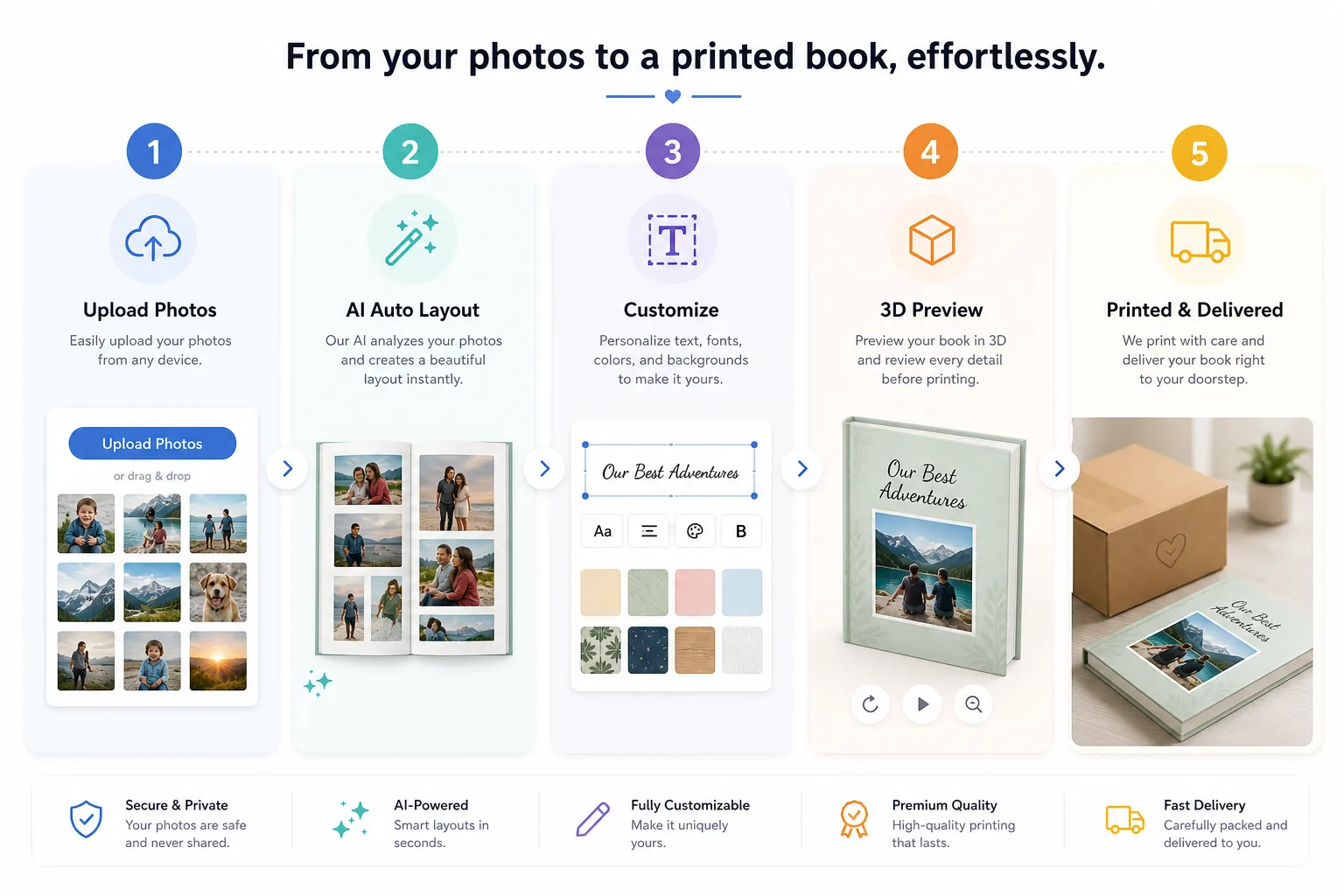
With Photo9, this flow is intentionally designed for speed and confidence. You do not need an app, and you do not need professional design experience. You can start on one device, continue on another, and still get a result that looks professionally designed.
Step-by-step: how to make your online printed book look great
Creating a book online is easy. Creating one that feels meaningful and polished takes a bit more thought. Here is how to do both.
Start with a clear purpose
Before you upload anything, decide what the book is for.
Ask yourself:
Is this a gift or a personal keepsake?
Is the focus emotional, documentary, or decorative?
Do I want a chronological story or a themed collection?
Will I include text, captions, or only photos?
A clear purpose makes all later choices easier.
Curate before you design
One of the biggest mistakes is uploading too many similar photos. More images do not always create a better book.
Try this quick filter:
keep only sharp, emotionally meaningful images
remove duplicates
avoid too many near-identical shots
choose a mix of wide scenes, detail shots, and portraits
think in sequences, not just single images
Build a story, not just a gallery
The best printed books feel intentional. Even simple family albums become more powerful when they follow a structure.
Good story flows include:
beginning, middle, and end
chapter-style sections
one event per spread
emotional pacing, with both highlight and quiet moments
captions that add context, not clutter
If you want help structuring images and words together, this guide on making your own book with pictures and text is a strong next step.
Use text sparingly but meaningfully
Text can elevate a book when used well. It can also overwhelm the design if overdone.
Great uses of text include:
cover title and subtitle
short introductions
dates and locations
quotes or family sayings
small captions that explain the moment
Keep fonts readable and placement consistent. Let the photos carry most of the emotion.
Pick materials that match the project
A premium wedding book may deserve a hard cover and more luxurious finish. A yearly family recap may work perfectly as a lighter, more affordable format.
Photo9 offers multiple product formats and themes, so you can choose what fits the story rather than forcing every project into the same template.
What makes a platform truly easy to use?
Not every online book maker is equally user-friendly. Many promise simplicity but still leave users doing most of the layout work manually.
Here is what actually makes the experience easy:
Features that save real time
Feature | Why It Matters |
|---|---|
AI-generated layouts | Removes hours of manual page arrangement |
Smart layout suggestions | Helps photos fit naturally and beautifully |
Browser-based access | No app download needed |
Cross-device editing | Start anywhere, continue anywhere |
3D preview | Reduces ordering mistakes |
Simple customization | Keeps control without complexity |
Secure checkout | Builds trust at purchase stage |
Fast delivery | Important for gifts and deadlines |
Photo9 is built around these exact needs. Instead of asking users to become designers, it gives them a strong starting point instantly, then lets them personalize from there.
Design tips for different kinds of books
Family memory books
Use warm, candid images and organize them by year, season, or milestone. Include short notes that future family members will appreciate.
Wedding books
Lead with your strongest hero image, then move through the day in sequence: preparation, ceremony, portraits, celebration, details. Elegant spacing and fewer images per page often work best.
Travel books
Mix landscapes, people, food, signs, and small local moments. A travel book becomes richer when it captures atmosphere, not just landmarks.
Baby and first-year books
Use monthly markers, milestone captions, and a soft visual palette. These books are especially meaningful as gifts for grandparents and future keepsakes for the child.
Gift books
When the book is for someone else, personalization matters most. Add names, dates, inside jokes, and meaningful quotes to make it feel unmistakably theirs.
How much does it cost to create and print a book online?
Pricing varies depending on format, page count, cover type, paper quality, and shipping. But the key thing to understand is this: online book printing is flexible.
Typical pricing factors
Book size: larger books cost more
Page count: more pages increase print cost
Cover type: hardcover usually costs more than softcover
Paper type: premium papers raise the price
Color printing: full-color interiors cost more than text-only pages
Quantity: single copies cost more per unit than larger orders
For most personal projects, the cost is still far less than many people expect, especially when compared with the emotional value of the finished book or the cost of generic gifts that are forgotten quickly.
Print quality: what to look for before you order
A beautiful digital preview is not enough. The final printed book must feel premium in real life.
Look for:
crisp image reproduction
durable binding
accurate colors
quality paper stock
strong cover construction
protective and recyclable packaging
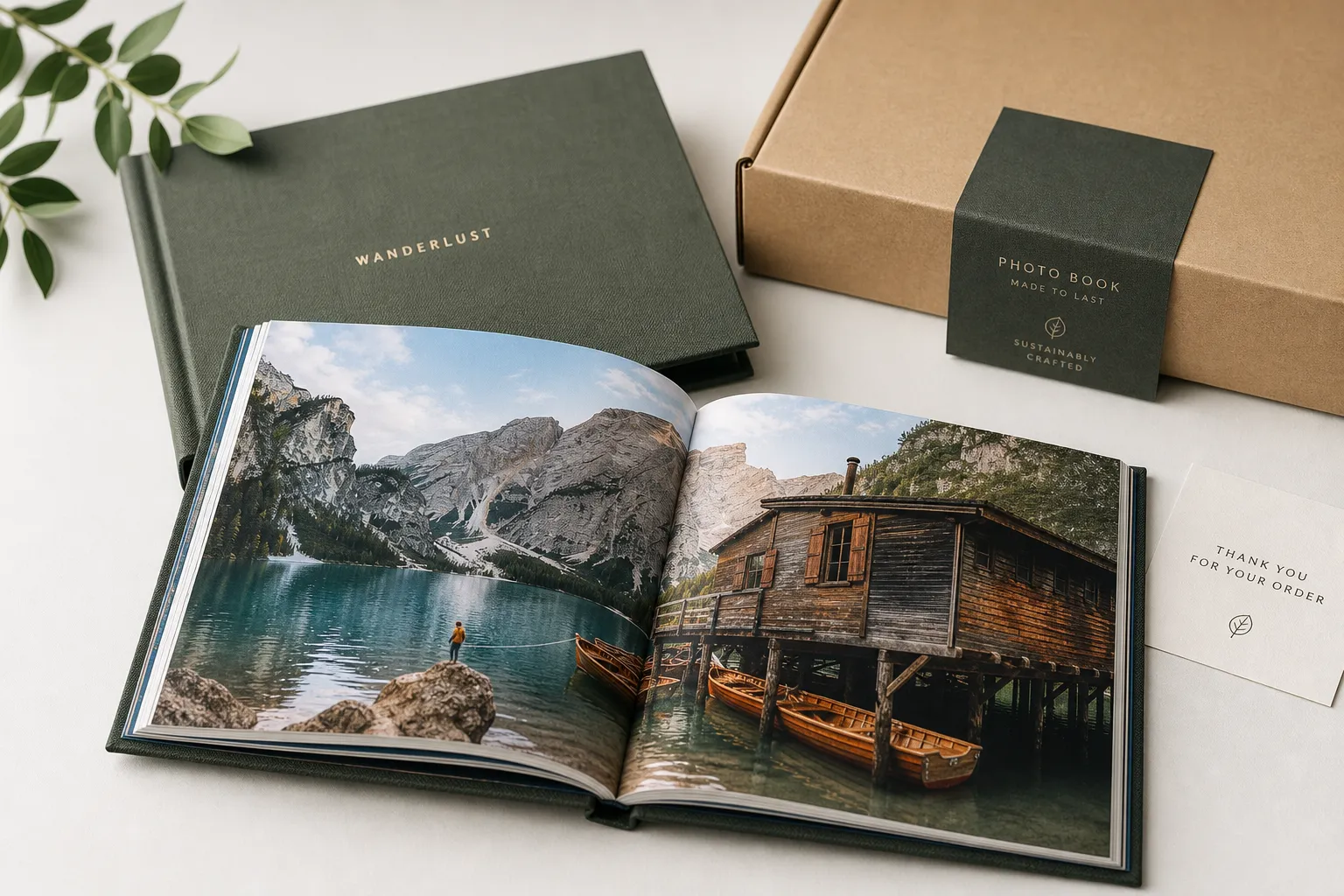
Photo9 puts strong emphasis on premium materials, high print quality, and a 100% satisfaction guarantee. That combination matters because it reduces the risk that your meaningful project ends up feeling flimsy or disappointing.
Sustainability matters more than ever
People increasingly want personalized products that feel thoughtful not only emotionally, but environmentally too.
"36% of U.S. consumers were more likely to buy or give a personalized gift compared to the previous year." - Statista
As personalized gifting grows, sustainability becomes part of the decision. Photo9 addresses this with local printing when possible to lower emissions, sustainable materials, FSC-certified paper choices, and recyclable packaging. That means you can create something beautiful while making a more responsible production choice.
Common mistakes to avoid when creating a book online to print
Even easy tools cannot fully save a project from a few avoidable mistakes.
1. Using too many photos
This makes pages feel cluttered and reduces emotional impact.
2. Ignoring image quality
Blurry screenshots and low-resolution images often print poorly.
3. Mixing too many styles
Too many fonts, colors, or layout types can make the book feel chaotic.
4. Skipping captions entirely
A few well-placed notes can add memory and meaning.
5. Not checking the preview
Always review every page before ordering.
6. Choosing the wrong format
A luxury event may deserve a premium hard cover, while a casual recap may suit a lighter option better.
7. Leaving the project too late
If the book is a gift, order early enough for production and shipping.
For a smoother design process, you may also like this guide on how to design a photo book online with ease.
Why Photo9 is a smart choice for modern book creation
If your goal is to create and print a book online easily, Photo9 solves the biggest problem most people face: time.
Instead of manually sorting, dragging, and arranging everything from scratch, Photo9 helps you move from idea to finished design in minutes with:
AI-generated layouts in seconds
smart layout suggestions based on your photos
no app required
cross-device access
simple text and background customization
3D previews before you order
multiple formats for photo books and wall art
premium materials and professional-quality printing
secure payment
fast and reliable delivery
100% satisfaction guarantee
local printing and sustainable packaging when possible
That makes Photo9 especially useful for people who want something meaningful and polished, but do not have the time or design confidence to build every page manually.
Final thoughts: the easiest way to turn memories into a real book
If you have been putting off a project because it feels too technical or time-consuming, now is the right time to start. You no longer need design software, print expertise, or hours of manual work to create something beautiful.
The best way to create a book online to print is to choose a platform that does the heavy lifting for you while still letting you make it personal. That is exactly the balance Photo9 offers: speed, customization, premium quality, and a smooth online experience from first upload to final delivery.
Whether you are making a wedding album, family keepsake, travel story, or heartfelt gift, Photo9 helps you turn digital memories into something real, lasting, and worth sharing. Start your book today and see how fast AI-powered design can become a printed keepsake you will want to revisit for years.
FAQ
Can I use ChatGPT to write a book and sell it?
Yes, you can use ChatGPT to help draft or structure a book, then sell it, but you should still edit, fact-check, and personalize the content. If you include copyrighted material or publish low-quality AI text without review, that can create legal or quality issues.
How much does a 300 page book cost to print?
The cost depends on size, cover type, paper quality, color printing, and quantity. A 300-page book can range from relatively affordable to premium-priced depending on whether it is a simple softcover or a higher-end hardcover photo-focused project.
How to easily print a book?
The easiest way is to use an online platform that lets you upload content, auto-generate layouts, customize, preview, and order in one place. Photo9 simplifies this with AI-powered design, browser-based editing, and fast delivery.
What is the best website for making a book?
The best website is one that combines ease of use, customization, print quality, and reliable delivery. For photo books and personalized keepsakes, Photo9 is a strong choice because it offers AI layouts, 3D preview, premium materials, and no app requirement.
Is it illegal to write a book with ChatGPT and publish it?
No, it is not automatically illegal, but you are responsible for ensuring the final work does not infringe copyrights, mislead readers, or violate platform rules. The safest approach is to use AI as a creative assistant, then add your own editing and originality.
How many books do I need to sell to make $100,000?
It depends entirely on your profit per book. If you earn $10 per copy, you would need to sell 10,000 books; if you earn $25 per copy, you would need to sell 4,000. Your pricing, print costs, and distribution model all affect the total.