
Turn iPhone Photos Into Book Ideas That Last
Photo 9
13 min read · June 16, 2026
Turn iPhone Photos Into Book Ideas That Last
Your iPhone is full of moments you meant to keep forever: baby smiles, weekend trips, birthdays, holidays, everyday chaos, and the tiny in-between memories that matter most. The problem is not taking photos. It’s actually doing something meaningful with them.
If you want to turn iPhone photos into book keepsakes, you do not need design skills, desktop software, or hours of dragging and dropping. Today, the easiest path is using a smart online photo book creator that can sort, suggest, and style your images in seconds, then let you personalize the result.
At Photo9, we believe your best memories deserve more than a camera roll. With AI-generated layouts, smart suggestions, easy browser-based editing, premium materials, and fast reliable delivery, you can create a polished photo book from your iPhone photos in minutes, not hours.

Why turning iPhone photos into a book matters more than ever
Most people have thousands of photos on their phones and revisit only a fraction of them. That means some of your most meaningful moments are sitting unseen in your library.
"Approximately 1.8 trillion photos are captured worldwide each year." - PetaPixel
"Nearly half of global consumers (48%) feel more emotionally connected to their memories after creating a physical photo product." - WhatTheyThink
A printed photo book changes that. It gives your memories structure, permanence, and emotional weight. Instead of scrolling endlessly, you get a story you can hold, share, gift, and return to for years.
This is especially powerful for:
families preserving milestones
new parents documenting first years
couples creating meaningful gifts
travelers turning trip photos into stories
students capturing graduation memories
anyone who wants a thoughtful personal gift without needing creative expertise
What most photo book guides miss
A lot of articles talk about “upload photos and print.” That is only part of the story. The real challenge is:
choosing the right photos fast
organizing them into a story
avoiding messy layouts
making everyday phone images feel intentional
finishing the project without getting stuck
That is where AI-assisted creation changes everything. Instead of manually building every page, Photo9 helps generate professional-looking layouts in seconds, suggests smart arrangements based on your images, and still gives you full control to fine-tune text, backgrounds, and design details.
If you want to design a photo book online with ease, this blend of automation and customization is what makes the process realistic for busy people.
Can you really make a beautiful book from iPhone photos?
Yes. Modern iPhone cameras are more than good enough for stunning printed books, especially when you choose the right photos and use a platform that helps optimize layout and storytelling.
The key is not perfection. It is curation.
A great iPhone photo book usually includes:
a clear theme or purpose
a mix of wide shots, close-ups, and candid moments
simple captions where they add meaning
breathing room in the layout
a strong cover image
print materials that make everyday photos feel elevated
With Photo9, you can create directly in your browser, across devices, with no app required. That means you can start on your phone, continue on a laptop, preview in 3D, and order when you are ready.
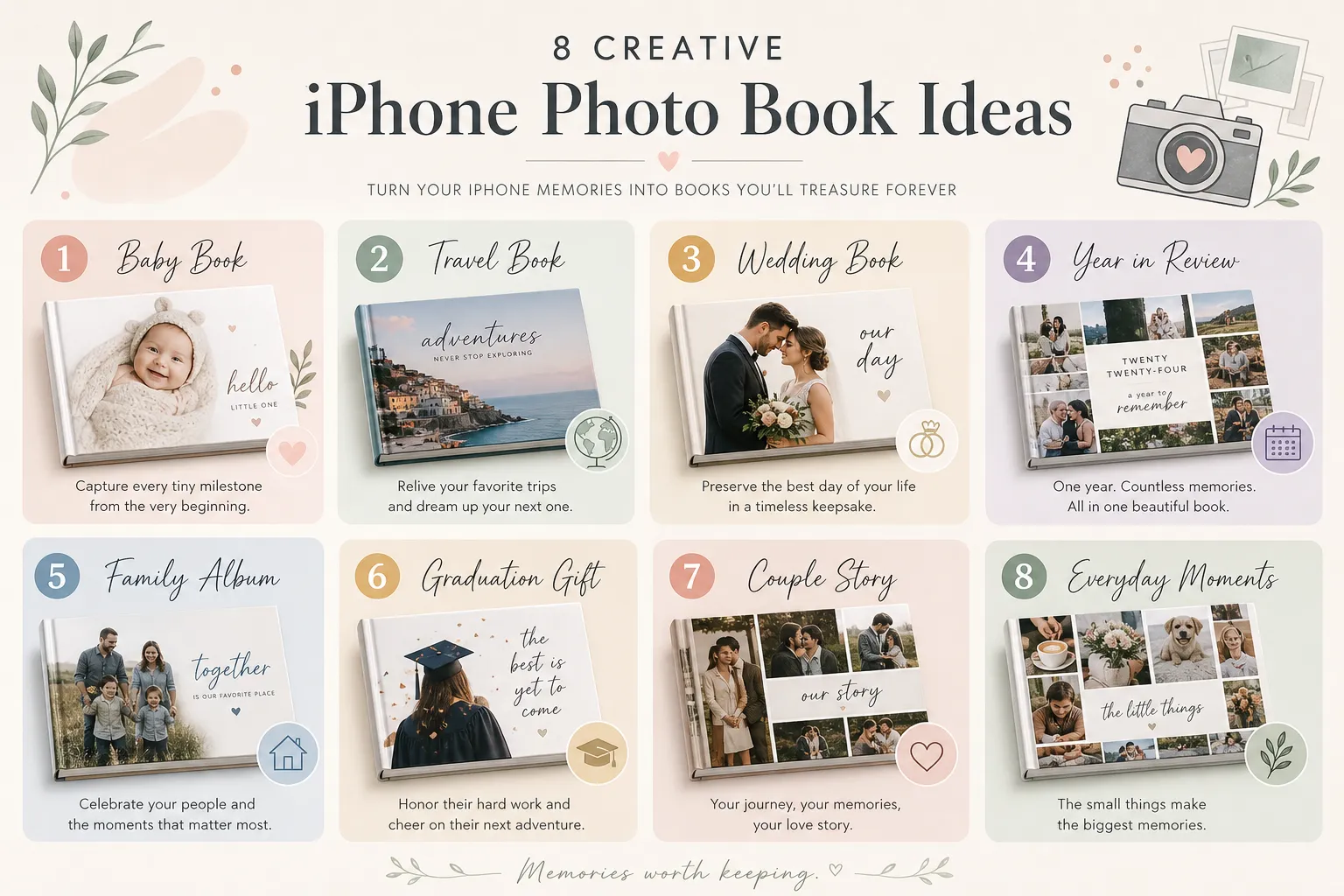
8 photo book ideas for your iPhone photos that actually last
Many people know they want a photo book, but not what kind. Here are the most lasting, giftable, and emotionally useful ideas.
1. The year-in-review book
This is one of the easiest and most meaningful options. Gather your favorite photos from the past year and tell the story month by month.
Best for:
families
couples
parents
anyone who takes lots of casual iPhone photos
Include:
birthdays
vacations
holidays
school milestones
pets
everyday moments at home
Photo9 tip: Use AI layout generation to quickly group photos into a clean timeline, then add short captions or month markers. You can also explore a dedicated year in review photo book format for this kind of project.
2. The baby’s first year book
If your camera roll exploded after a new baby arrived, this is your answer. Organize photos by month or milestone.
Great pages to include:
first days at home
monthly portraits
first smile
first holidays
family visits
nursery details
tiny everyday moments
The most moving baby books are not only polished portraits. They also include sleepy selfies, bottle time, and the beautifully imperfect parts of real life.
3. The travel story book
Travel books work best when they tell a story, not just show a highlight reel. Start with departure, move through places and moods, and end with the return home.
Include:
airport or road trip moments
scenery
food
people you met
spontaneous snapshots
map-inspired chapter pages
one or two standout full-page images
For more inspiration, see these custom travel photo album ideas for every trip.
4. The wedding or anniversary memory book
You do not need to wait for a professional album. Your iPhone likely holds behind-the-scenes moments, candid guest shots, engagement memories, and honeymoon highlights that deserve their own book.
Use this idea for:
engagement-to-wedding storybooks
anniversary gifts
vow renewal books
“our years together” timelines
A personal photo book often feels more intimate than a formal album because it includes the real moments around the milestone.
5. The family everyday album
Not every book needs a big occasion. One of the most treasured formats is a book made from normal life.
Think:
breakfast messes
backyard play
Sunday walks
after-school routines
couch cuddles
pets doing pet things
These are often the photos people treasure most later, because they show what life actually felt like.
6. The graduation or student memory book
This makes a strong gift for graduates, students, or proud parents.
Ideas to include:
first and last day photos
friends
campus events
sports
achievements
funny screenshots or messages
family celebration photos
You can make it playful, sleek, sentimental, or all three.
7. The couple story or love book
Perfect for birthdays, anniversaries, Valentine’s Day, or just because. Start with how it began and build forward.
Possible chapters:
how we met
favorite trips
date nights
everyday moments
milestones
favorite notes or quotes
future dreams
8. The memory gift book for grandparents or friends
A compact photo book can be one of the most personal gifts you give. Instead of generic presents, create a book filled with shared memories.
Popular versions include:
grandchildren highlights
friendship memories
family reunion books
birthday tribute books
remembrance books
How to choose the right iPhone photos for a book
You do not need to use your “best” photos only. You need the right mix.
Use the 60-30-10 rule
A simple way to curate:
Type of photo | Share of book | Purpose |
|---|---|---|
Strong hero images | 60% | Anchor the story with your clearest, most meaningful shots |
Supporting detail images | 30% | Add texture, atmosphere, and variety |
Imperfect but emotional images | 10% | Add authenticity and heart |
Look for story value, not just technical perfection
Choose images that answer questions like:
What happened?
Who was there?
What did this season of life feel like?
Which moments would I want to show someone 10 years from now?
Avoid common selection mistakes
Skip or limit:
15 nearly identical shots
too many screenshots unless they add context
very dark images with no subject
random filler photos that do not support the story
How to turn iPhone photos into a book step by step
Here is the simplest workflow.
1. Create a temporary album on your iPhone
Start by making a dedicated album for the project. This reduces overwhelm and keeps your chosen photos together.
Name it something clear, like:
2025 Family Book
Emma First Year
Italy Trip
Dad Birthday Gift
2. Select more photos than you think you need
If your book may use 80 images, start by choosing 120 to 150. It is easier to trim than to keep hunting later.
3. Group photos into rough sections
Think by:
month
event
day
location
people
emotional arc
4. Upload to a smart photo book platform
This is where the experience changes. Instead of manually placing every image, use a creator that helps you build the first draft automatically.
Photo9 can generate layouts in seconds, suggest smart compositions, and make the whole process feel manageable even if you have zero design experience.
5. Personalize the design
Add:
a title
short captions
dates
simple background changes
chapter pages
one quote or dedication if it fits
If you want a more text-led project, these tips for a photo book maker with text for meaningful gifts can help.
6. Preview before ordering
Always review:
image cropping
page order
caption typos
blank spaces
cover clarity
A 3D preview is especially useful because it helps you see the project more like a finished object than a flat screen design.
7. Print and share
Order one for yourself and extra copies for gifting if relevant. A good digital backup also makes reordering easy later.
Best design styles for iPhone photo books
Your photos can look dramatically different depending on the visual style you choose.
Minimal and modern
Best for:
travel
weddings
couple books
portfolio-style books
Features:
white space
clean typography
fewer photos per page
strong full-bleed images
Warm scrapbook-inspired
Best for:
family books
baby books
memory gifts
Features:
soft backgrounds
captions
playful details
cozy storytelling feel
Editorial coffee-table style
Best for:
milestone books
premium gifts
design-conscious users
Features:
bold cover
intentional image pacing
elegant typography
large hero images
Dense memory-book style
Best for:
year-in-review
school years
family archives
Features:
more photos per spread
chronological sequencing
practical storytelling
compact documentation
iPhone photo book ideas by life moment
Sometimes the easiest way to start is matching the book idea to the life stage.
Life moment | Best book concept | Why it works |
|---|---|---|
New baby | First year milestone book | Turns chaotic phone photos into a keepsake |
Wedding season | Engagement to honeymoon story | Captures both polished and candid moments |
Big trip | Travel journal photo book | Organizes memories into a narrative |
Growing family | Annual family book | Easy tradition that compounds in value |
Graduation | Achievement and friendship book | Makes a highly giftable personal story |
Birthday gift | Tribute or memory book | More emotional than a standard gift |
Everyday life | Monthly life album | Preserves the moments usually forgotten |
Why Photo9 is especially good for turning iPhone photos into books
There are many photo book services, but most still make you do too much manual work. Photo9 is built for people who want beautiful results without a complicated process.
What makes Photo9 different
AI-generated layouts in seconds so you are never staring at a blank page
No app required because creation happens in your browser
Cross-device access so you can start anywhere and continue anywhere
Smart layout suggestions based on your image selection
3D preview for confidence before printing
Easy customization with text, themes, and backgrounds
Multiple product formats including photo books and wall art
Premium materials and print quality for keepsakes that feel special
Secure payment and satisfaction guarantee to build trust
Fast reliable delivery with local production where possible
Sustainable materials and recyclable packaging for a lower-impact choice
If you want to browse formats first, start with Photo9’s photo books collection.
Softcover or hardcover: which should you choose?
Your format should match the purpose of the book.
Softcover is best if you want:
a lighter, affordable option
multiple gift copies
a casual annual or travel book
something easy to create often
Hardcover is best if you want:
a premium keepsake
a wedding or baby milestone book
a gift with extra wow factor
something shelf-worthy and durable
For most important memory projects, hardcover is the stronger long-term choice because it feels more timeless and giftable.
Tips to make everyday iPhone photos look premium in print
You do not need a pro camera. You do need smart editing and sequencing.
Use fewer photos per page for stronger impact
If a photo is emotionally or visually strong, let it breathe. Not every spread needs a collage.
Keep captions short and meaningful
Examples:
June 2025
First beach day
The week we needed most
Home, finally
Mix candid and composed images
A book feels richer when it combines:
portraits
action shots
environment shots
detail photos
funny throwaway moments
Build rhythm into the pages
Alternate between:
full-page moments
two-photo spreads
one busy collage page
one quiet simple page
Do not overdesign
The photos are the story. A clean layout usually wins over too many embellishments.
A smarter alternative to “someday”
The biggest reason people never finish a photo book is friction. Too many decisions. Too much manual formatting. Too many half-started projects.
That is why AI matters here. It removes the tedious part without removing your voice.
Photo9 helps you go from scattered iPhone photos to a polished keepsake quickly, while still letting you shape the final result. That means more finished books, more meaningful gifts, and fewer forgotten memories.
Final thoughts: your best iPhone photos deserve a life beyond the camera roll
If you want to turn iPhone photos into book keepsakes that last, the best idea is the one you will actually finish. Start with a theme you care about, choose the moments that tell the real story, and use a tool that removes the hard part.
Photo9 makes this easy with AI-powered design, professional layouts, simple customization, cross-device access, premium print quality, and sustainable production choices. Whether you are making a family yearbook, a travel story, a baby milestone album, or a deeply personal gift, you can create something beautiful in minutes.
Your photos are already there. The story is already there. Now turn it into something you can hold.
FAQ
How to make a book out of photos on iPhone?
Create a dedicated album on your iPhone, choose the photos you want, and upload them to an online photo book maker like Photo9. The easiest route is using an AI-powered platform that automatically builds layouts, then lets you customize text, covers, and page order before printing.
What's a good app to organize photos and turn into photo books?
A strong option is a service that helps you organize and design in one place, but you do not necessarily need an app. Photo9 works in your browser, uses AI to suggest layouts in seconds, and makes it simple to turn organized iPhone albums into premium photo books.
Can I turn photos into a book?
Yes, absolutely. You can turn everyday phone photos into a printed book by selecting a theme, uploading your images, and using a smart design platform to create a finished layout that is ready to print.
Can I create a photo book from Apple Photos?
Yes, you can use albums created in Apple Photos as the starting point for your project. Most modern photo book services let you upload those selected images and transform them into a custom printed keepsake.
Can I turn photos into a book?
Yes. The key is choosing photos that tell a story, then using a tool that makes layout and customization easy. With AI-assisted creation, the process becomes much faster and more beginner-friendly.
Does Apple have a photo book maker?
Apple Photos is great for storing and organizing images, but most people now use specialized third-party services to print books. A platform like Photo9 offers more flexible design, AI-generated layouts, premium print options, and a smoother path from iPhone photos to a finished book.